

In the dynamic landscape of CI/CD pipelines, the quest for efficiency and transparency is ever-evolving. Our system currently boasts a seamless solution for effortlessly locating the -ci.yml file associated with a pipeline. However, while DataOps currently provides a convenient solution for pinpointing the -ci.yml file of a pipeline, it's essential to acknowledge that this feature is exclusively applicable when the pipeline isn't triggered by a schedule. To acquire this information in such scenarios, you can leverage the following API call:
curl --header "private-token: TOKEN" "https://app.dataops.live/api/v4/projects/XXXX/pipelines/XXX/variables"By parsing the results obtained from this API call, you can extract the _PIPELINE_FILE_NAME variable, enabling you to identify the associated -ci.yml file.However, it's crucial to recognize the limitation posed by this approach when dealing with pipelines triggered through schedules. In such cases, the conventional method may not yield the desired -ci.yml file information and alternative approach can be proposed:
While DataOps seamlessly integrates with MS-Teams out of the box, it's worth noting that by investing some additional effort and leveraging the Microsoft Adaptive Cards designer, we can enhance this integration to deliver real-time updates on scheduled pipeline statuses. This customisation extends beyond the standard integration, allowing for more granular insights based on specific branches and associated -ci.yml configurations.
To fully harness the capabilities we offer, let's explore this sample configuration:
.teams_notification:
  stage: Pipeline Notification
  extends: .agent_tag
  image: $DATAOPS_API_RUNNER_IMAGE
  retry: 2
  variables:
    TEAMS_WEBHOOK_URL: DATAOPS_VAULT(TEAMS_WEBHOOK_URL)
    NOTIFICATION_TITLE: "${CI_PROJECT_TITLE}"
    DATAOPS_SOURCE_FILE: $CI_PROJECT_DIR/env.sh
    NOTIFICATION_IMAGE: https://dataops-public-assets.s3.eu-west-2.amazonaws.com/dataops-icon.png
  script: |
    /dataops
    cat << EOF > payload.json
    {
      "type": "message",
      "summary": "${NOTIFICATION_SYMBOL} ${_PIPELINE_FILE_NAME} ${STATUS} (${CI_COMMIT_REF_NAME}) - ${NOTIFICATION_TITLE}",
      "attachments": [
        {
          "contentType": "application/vnd.microsoft.card.adaptive",
          "contentUrl": null,
          "content": {
            "$schema": "http://adaptivecards.io/schemas/adaptive-card.json",
            "type": "AdaptiveCard",
            "version": "1.2",
            "body": [
              {
                "type": "TextBlock",
                "size": "Medium",
                "weight": "Bolder",
                "text": "${CI_PROJECT_TITLE}"
              },
              {
                "type": "ColumnSet",
                "columns": [
                  {
                    "type": "Column",
                    "items": [
                      {
                        "type": "Image",
                        "style": "Person",
                        "url": "${NOTIFICATION_IMAGE}",
                        "size": "Medium"
                      }
                    ],
                    "width": "auto"
                  },
                  {
                    "type": "Column",
                    "items": [
                      {
                        "type": "TextBlock",
                        "spacing": "None",
                        "weight": "default",
                        "text": "**Pipeline**: ${_PIPELINE_FILE_NAME}",
                        "isSubtle": false,
                        "wrap": true
                      },
                      {
                        "type": "TextBlock",
                        "spacing": "None",
                        "weight": "default",
                        "text": "**Branch**: ${CI_COMMIT_REF_NAME}",
                        "isSubtle": false,
                        "wrap": true
                      },
                      {
                        "type": "TextBlock",
                        "spacing": "None",
                        "weight": "default",
                        "text": "**Status**: ${STATUS} ${NOTIFICATION_SYMBOL}",
                        "isSubtle": false,
                        "wrap": true
                      },
                    ],
                    "width": "stretch"
                  }
                ]
              },
              {
                "type": "TextBlock",
                "text": "Pipeline ${STATUS}. [See more](${CI_PIPELINE_URL}).",
                "wrap": true
              }
            ]
          }
        }
      ]
    }
    EOF
    source $DATAOPS_SOURCE_FILE
    curl -H 'Content-Type: application/json' -d @payload.json $TEAMS_WEBHOOK_URL

"Notification on Fail":
  stage: Pipeline Notification
  extends:
    - .teams_notification
  variables:
    STATUS: "failed"
    NOTIFICATION_SYMBOL: "❌"
  when: on_failure


"Notification on Success":
  stage: Pipeline Notification
  extends:
    - .teams_notification
  when: on_success
  variables:
    STATUS: "success"
    NOTIFICATION_SYMBOL: "✅"
The purpose of this code is to send notifications to Microsoft Teams channels based on the success or failure of a pipeline run. Let's break down the code. You can notice several key points in the code. First you can notice that the TEAMS_WEBHOOK_URL is a variable which value is stored in the DATAOPS_VAULT. We do this, as the TEAMS_WEBHOOK_URL could be considered sensitive information. The primary concern is that if an individual with malicious intent obtains that URL, they could potentially send an Actionable Message with a form. The contents of this form could then be forwarded to an endpoint outside of our control. There's a risk that they might disguise this form as an HR-provided form, soliciting sensitive information or etc. For this very reason, we exercise additional caution by preserving this value and securely storing it in the vault. To retrieve it, our script section begins with /dataops, followed by source $DATAOPS_SOURCE_FILE. This approach guarantees the secure loading of the variable during runtime.
The rest of the script section creates a JSON payload using a heredoc (cat << EOF) and then sends a notification to Microsoft Teams using curl. The payload includes details about the pipeline run such as pipeline name, status, branch, and a link to the pipeline in the DataOps CI/CD environment. It's important to note that Adaptive Cards offer the flexibility to customize the payload to cater to any specific requirements.
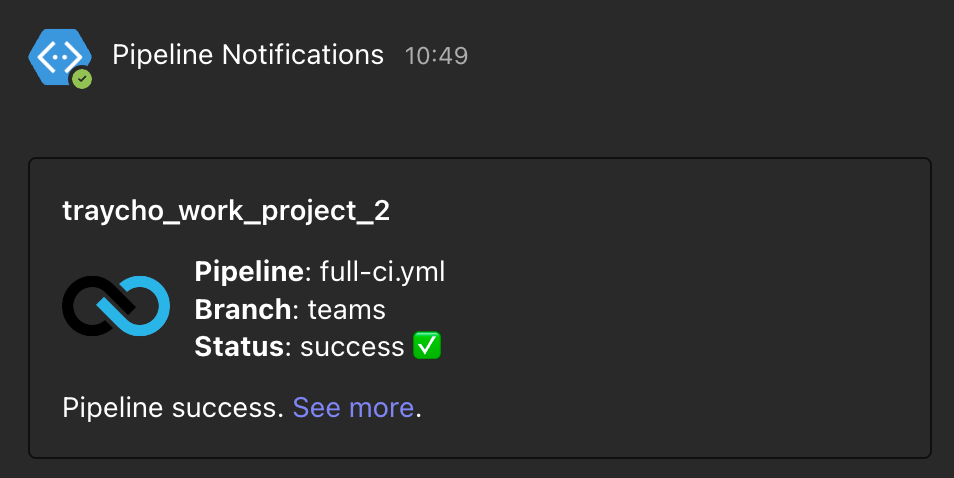
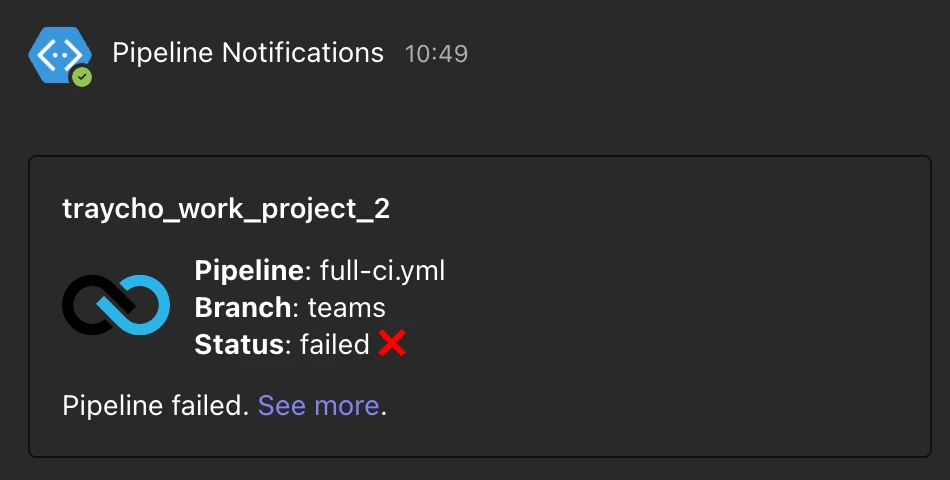
As a whole the configuration defines a reusable job template (".teams_notification") for sending Microsoft Teams notifications and then creates two specific jobs that extend this template. One job sends a notification on pipeline failure, and the other sends a notification on pipeline success. The notifications include details about the pipeline run and use different symbols (❌ for failure and ✅ for success) to visually indicate the outcome.
The notifications that appear in Teams have the following appearance:
The demonstrated approach allows you to fully utilise the flexibility of custom Microsoft Teams notifications to provide a comprehensive solution for obtaining pipeline information, regardless of the triggering mechanism.